 Not seeing a particular option on your
 Edit and Delete Bookmark
In the left menu, click the  Bookmark Editor option. A list of existing bookmarks will appear. Click on the
  option next to the bookmark you’d like to edit.
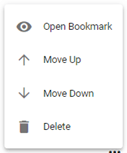
Select  Move Up to move the selected bookmark up on the list of options, or
  Move Down to move the selected bookmark down on the list of options. The Move Up and Move Down options impact the bookmarks location on the Bookmarks menu as well as which Bookmarks appear on the Homepage. Select
  Delete to remove the bookmark as an option.
If you’d like to delete several bookmarks, check off the ones you’d like to delete on the left-hand side of the page. Once all have been checked, click  , then select Delete Selected Bookmarks from the dropdown list of actions.
Video Tutorial: Change Bookmark Order
How do I change the order of a bookmark for my system: A short video of how to edit the ordering of bookmarks
Video Tutorial: Delete Bookmark
How do I change the order of a bookmark for my system: A short video of how to edit the ordering of bookmarks