 Not seeing a particular option on your
 Viewing Schedules in Internals
To view all the schedules in the program, click on the  System Settings icon in the upper right corner of the homescreen. Select Assignment & Schedule Internals and then choose the Schedule option.
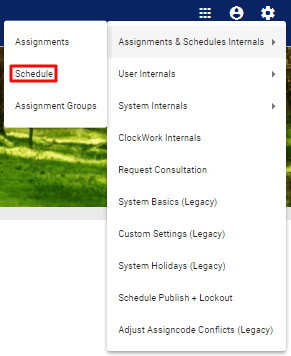
In the Schedule Internals page, a list of all the schedules in use by the system is displayed.

Important note: Under Type, schedules are categorized as Primary or Composite.
Primary schedules are the schedules where the assignments live, whereas Composite schedules are a blend of two or more primary schedules.